
Media library
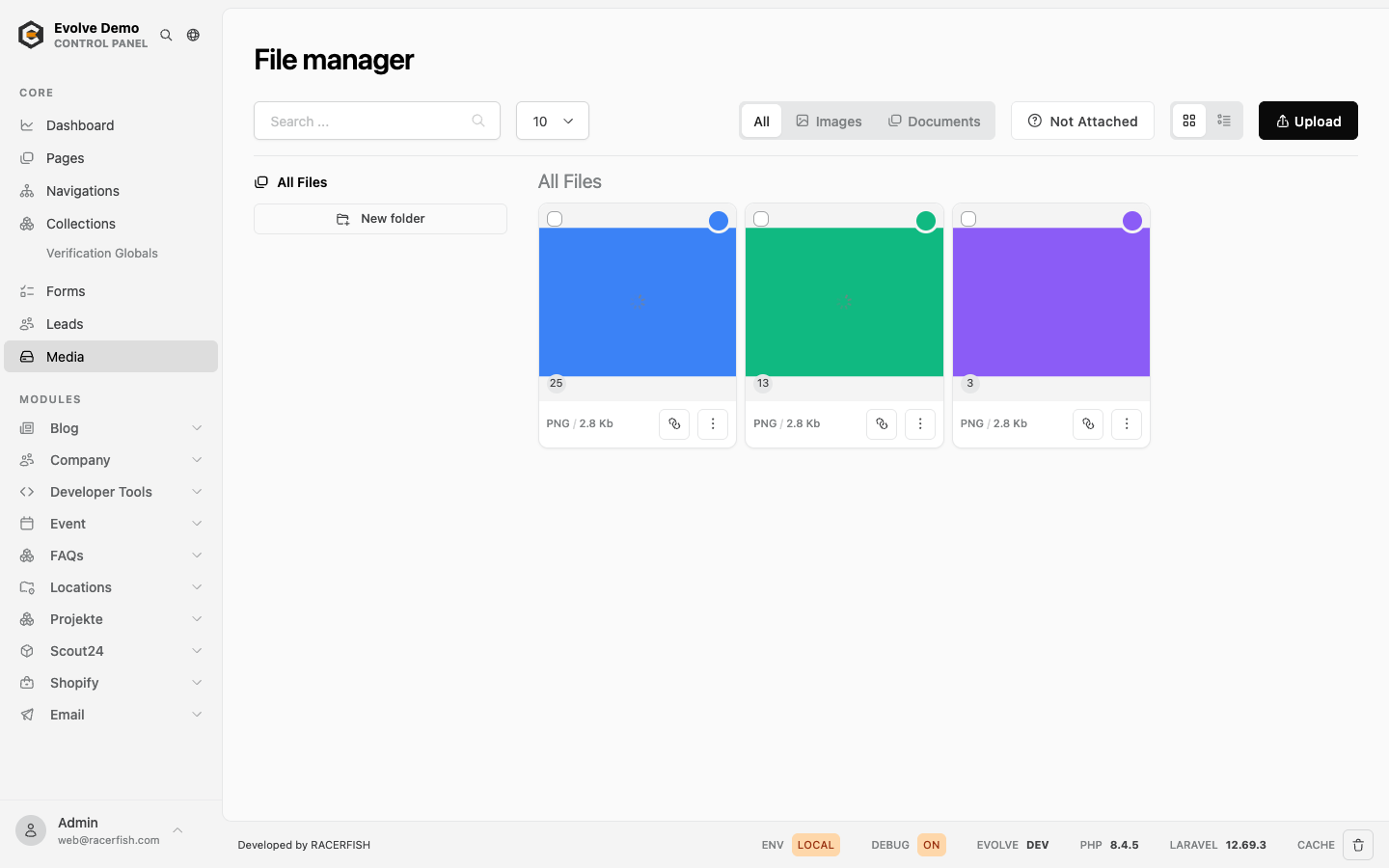
The media library at /evolve/media holds every uploaded file: images, documents, video and audio. Images are rendered into the variants the theme asks for; everything else is served as uploaded. Blocks and records reference media by ID, so a file replaced in the library changes everywhere it is used.
Who can open it
evolve.roles.media lists the roles, default developer, admin and content_manager; the permission is media.manage. See Roles.
Uploads
| Setting | Default | Where |
|---|---|---|
| Maximum file size | 10000 KB | evolve.media-manager.max-file-size in config/evolve.php |
| Allowed extensions | jpg, jpeg, png, gif, webp, avif, bmp, ico, pdf, doc, docx, xls, xlsx, ppt, pptx, csv, txt, mp4, webm, mov, mp3, wav, ogg, zip | evolve.media-manager.allowed-extensions |
SVG, HTML, XML and JavaScript are excluded on purpose: the browser executes them when served from the media URL, which turns an upload into stored cross-site scripting. Add an extension only when that risk is understood. Neither setting has a .env key; publish the config to change them.
Working in the library
- Folders: create, rename, delete, move files and folders between them. The path shows above the grid.
- Filters: All, Images, Documents as a segmented control; grid or list; "Not attached" shows files no record references.
- Tags on files, shared with the rest of the panel.
- File drawer (since 2.13): preview with the focal point on top, name, description, alt text and tags below, Replace and Delete in the footer. The focal point decides what survives when the theme crops an image.
- Used by: the drawer lists every record and field that references the file, and the card shows the count. A file still in use cannot disappear silently.
- Download selected zips the selection.
- Approval and rights (badges, filters, a governance block in the drawer, bulk review) come with the Media Governance module, off by default.
File URLs 2.19
Documents, video, audio and every other file that is not rendered as an image are served under a readable URL: the hash identifies the file, the name follows as a slug with the extension.
/media/dGVpG23oQz/pflegeanleitung-grosse-2026.pdfThe copy link button on the card, in the list and in the search palette copies this URL, and the downloads block links it. Only the hash decides which file is served, so a renamed file keeps working under its old link, and the slug in an old link may be anything. Links without a slug (/media/dGVpG23oQz and /media/dGVpG23oQz/, the shape before 2.19) keep working unchanged, as do /media/{hash}/download (always a download) and /media/{hash}/preview (the first page of a PDF as an image). The browser shows the file under its media name, with umlauts, in both cases.
In a template, $media->path() returns this URL for files and the rendered variant for images; $media->filePath() returns the readable URL of the original file for every type, images included.
Image metadata and recognition
On upload, Evolve reads width, height and EXIF data. With IMAGE_RECOGNITION=true and a Google service account in GOOGLE_APPLICATION_CREDENTIALS, Cloud Vision adds labels (objects, logos, visible text) as suggested tags so that images are searchable without manual tagging. php artisan evolve:update-image-metadata fills in metadata for files that were uploaded before, or when recognition was turned on later.
Image rendering
The theme requests image variants (sizes, crops, WebP and AVIF derivatives) through <x-image>. Variants render on first request, or in a queue when QUEUE_CONNECTION is not sync. IMAGE_DRIVER chooses gd (default) or imagick; IMAGE_ALLOW_IDS lets a template request an image by ID. The full pipeline, including evolve:images:warm and evolve:clear-images, is on Image Rendering.
Maintenance commands
| Command | Does |
|---|---|
evolve:index-media-usages | Rebuilds the "used by" index from blueprint fields and inline links in block content. Run after importing content or when counts look wrong. |
evolve:prune-media-attachments | Removes attachments that point to deleted records or to model classes that no longer exist. |
evolve:update-image-metadata | Reads and saves missing image metadata, with recognition when enabled. |
evolve:images:warm [--missing] | Queues the variants the theme requests, all or only the missing ones. |
evolve:clear-images | Deletes every rendered variant; they render again on request. |
Media files live in storage/app and are shared between releases since 2.12 (shared/storage/app), so a deploy keeps them and evolve:env:setup and the Envoy media tasks move them between environments. See Deployment.
Verifying
Upload an image, set a focal point, place it on a page and check the crop in the frontend. Open the file drawer: "Used by" names the page. php artisan evolve:index-media-usages reports the number of usages it indexed.